An AI desktop app builder for software that lives on the PC
Some work cannot wait for a page to load. The cashier, the receptionist and the stock keeper need software that opens instantly, keeps working when the internet drops, and prints on the printer in front of them. That is what Fanann Windows Studio builds, and we will also tell you when a web app is the better choice.
Three reasons a browser tab cannot replace
It works when the internet does not
In Local mode the app and its data are on the PC itself. A dropped connection does not stop sales or invoicing.
It is made for a full day of work
It opens straight onto the work screen, with no marketing page and no address bar. Menus, keyboard shortcuts, and grids that show fifty rows rather than five.
It reaches the printer and the files
A receipt from the receipt printer, a report saved where you choose, a backup in a file. All of it with your permission.
Local data: software that depends on no one
In Local mode the data is kept in a database file on the PC. No server, no database hosting subscription, no connection. It suits a tool one person uses, or the single machine in the shop. That simplicity costs two things: every PC has its own data, and backups are on you.
- Does not stop when the internet does
- No recurring hosting charge for the local database
- Backup and restore from inside the app
A desktop interface, not a website in a frame
Fanann builds a Windows app from desktop parts: a menu bar, a command bar, a data grid you can sort and select with the keyboard, a list beside its detail, and a status bar. The familiar shortcuts work: Ctrl+N for a new record, Ctrl+S to save, F2 to edit, Del to delete.
- Density that suits big screens and fast work
- Right-click menus and dialogs
- Arabic right-to-left in every element
Four abilities from Windows, each with its own switch
Printing, saving and opening files, notifications, and backup and restore. Each ability is off until you switch it on, and the studio explains in plain language what it allows. The app does not roam your PC’s files: it reaches only what you choose in the Windows dialog.
- Print layouts for receipts and invoices
- Export and import through the Save and Open dialogs
- What you did not switch on, the installed app refuses
Shared data when the business outgrows one PC
When more than one employee works on the same records, the data moves to Fanann Cloud: one database of your app’s own, which every employee signs in to from their PC. The software is still desktop software, menus and printing included, but it now needs internet.
- Everyone sees the same records
- A sign-in for each employee
- Uses your plan’s cloud allowance
Desktop app vs web app: which one is for your job?
Fanann builds both. This is an honest comparison to help you pick the right tool, not to sell you one of them.
| The need | Windows app (Windows Studio) | Web app (Fanann builder) |
|---|---|---|
| Working offline | Yes, in Local mode | No: it needs a connection |
| Who uses it | Your staff on work PCs | Anyone with the link, your customers included |
| Devices | Windows 10 and 11 only | Any browser: PC, phone, tablet |
| Printing | Windows printers, with a layout designed for the receipt or invoice | The browser’s print window |
| Getting it to people | An installer installed on each PC | A link you open |
| Updating | A new installer for each version | Published once, everyone has it |
| Online payments from customers | Not what it is for | Yes, with local payment methods |
A quick rule: if the users are your staff on fixed PCs, go desktop. If they are your customers, or on their phones, go web.
Jobs that suit desktop software
The counter
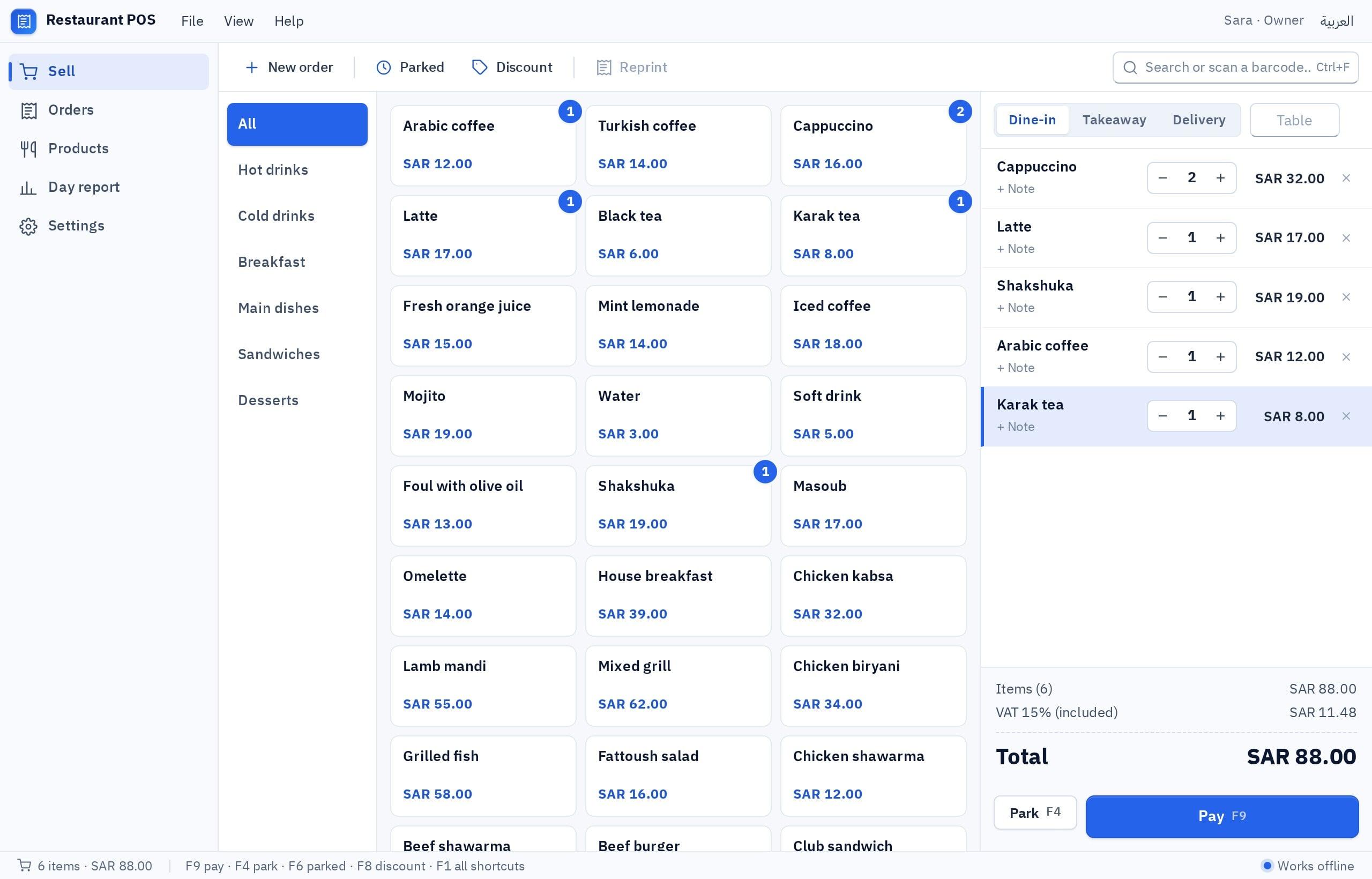
A point of sale the cashier taps hundreds of times a day, printing the receipt at once. Every second of delay turns into a queue.
“A POS for a bakery: products with pictures, an 80 mm receipt, and it works offline.”
The back office
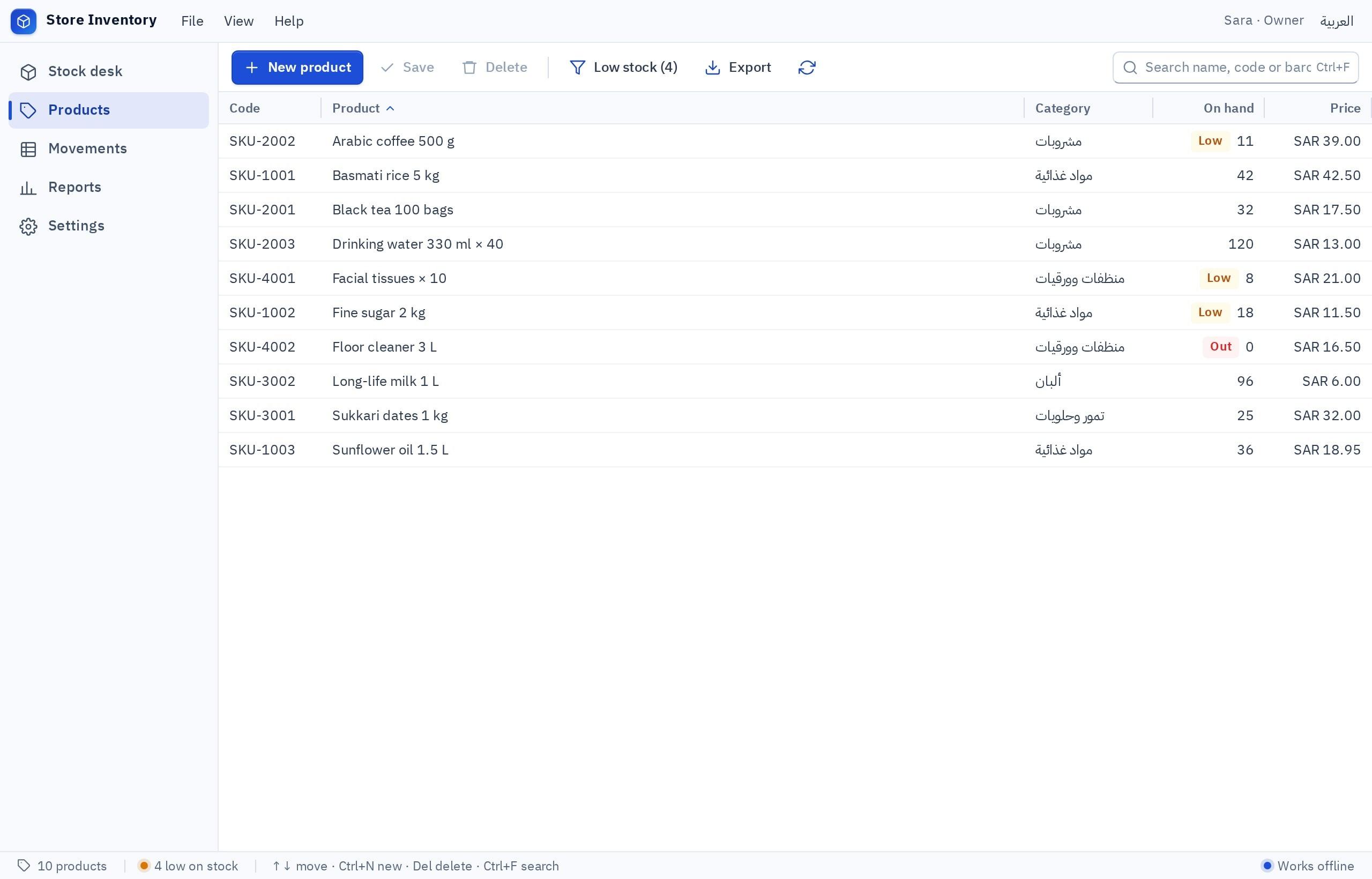
Stock, suppliers, purchase invoices: long tables and a lot of typing. This is where the keyboard and dense grids earn their keep.
“Inventory with barcodes, and I move between fields with the keyboard.”
The private tool
Your expenses, your office invoices, your files: data that has no reason to leave your PC at all.
“An expense tracker just for me, with its data only on my PC.”
How to decide between desktop and web in five questions
Answer them in order. The answer is usually clear by the second or third.
- 1
Write down who will use the software, and where
Staff on PCs at the workplace: desktop is a candidate. Customers, or field staff on phones: a web or mobile app.
- 2
Ask: what happens if the internet is down for an hour?
If the answer is “we stop selling” and that is not acceptable, you need desktop in Local mode.
- 3
List what it must print or save
Receipts, labels, A4 invoices, export files: the longer the list, the stronger the case for desktop.
- 4
Count the PCs that must see the same records
One: Local. More than one: Fanann Cloud, and with it a need for internet. The decision guide.
- 5
Build the preview and try it before you commit
The preview does not use your build allowance. Try a real task, then decide whether to build the installer.
Plainly: when a desktop app is the wrong tool
Questions people ask
What is the difference between a desktop app and a web app?
Does the desktop app work with no internet at all?
Can I build the desktop app for Mac?
Will the software be slow or heavy?
Can I have a Windows app and a web app on the same data?
The rest of Windows Studio
AI Windows app builder
The main page: describe your business software in plain words, watch it take shape in a Windows window, choose where its data lives and download a real installer.
Meet Windows StudioBuild a Windows app with AI
The steps in plain language with a worked example: from one sentence about the job, to an interactive preview, to the data choice, to the installer.
See the detailsCreate an EXE installer with AI
What is inside the installer, how to install it on more PCs, how versions work, and how to verify the file.
See the detailsAI POS software builder
A point of sale for a restaurant or shop: orders, receipts, the printer, and how staff see the same orders on more than one PC.
See the detailsAI inventory software builder
Inventory software on Windows: products, barcode input, stock movements and their history, reports, and when local data is enough.
See the detailsWindows app templates
Eight starting points you can change: POS, inventory, invoicing, expenses, front desk, attendance, labels and a file organizer, each with a suggested data location.
See the detailsCompare: local vs cloud data
The decision guide: where should your app’s data live? A comparison table, real scenarios, costs, and why five PCs do not share a local database.
See the detailsGuide: Windows app from idea to EXE
A long-form guide for business owners: writing the brief, reviewing the preview, choosing the data location, building the installer, sharing and updating it.
Read the guideSoftware that opens instantly, and works even offline.
Describe the work that happens on your PCs, try it in a Windows window, then download the installer. Signing up is free.