There are five ways to make a Windows app: learn a programming language and its tools, hire a freelancer or a software company, buy ready-made software, use a no-code builder, or describe the program to an AI builder. If you are not a programmer, the fastest route is to write what the program should do in plain words, watch it run inside a Windows-style window, choose whether its data lives on the PC or in the cloud, and download an .exe installer for Windows 10 or 11.
- how can I make a Windows app
- how to make a Windows program without coding
- how to create desktop software for my business
- can AI make a Windows app for me
- how long does it take to learn to make Windows software
- make a Windows app for beginners
Can someone who is not a programmer really make a Windows app?
Yes. Until recently, making a Windows app meant spending many months learning to program, or paying someone who already can. There is now a practical third route: you write what you want in plain language, an AI builder constructs it, and you watch it run before you install anything.
This guide is for the shop owner, office manager, accountant, freelancer or student with a task that repeats on a computer every day. The honest map comes first, including routes that have nothing to do with Fanann, then the shortcut.
A Windows app (desktop app) is software you install on a PC and open from the Start menu, with its own window, menus and shortcuts. A website in a browser is a different thing; if you are unsure which you need, read desktop app or web app.
What are the ways to make a Windows program?
There are five, and none is best for everyone:
| Route | What you pay | Who it suits |
|---|---|---|
| Learn to program yourself | Months of steady study before a first useful program | Students and future developers |
| Hire a freelancer or company | Money, plus time explaining and following up | A budget and complex needs |
| Buy ready-made software | A license or subscription, and you adapt to it | Work that looks like everyone else's |
| Use a no-code builder | Time to learn the tool and its limits | People who like assembling things |
| Describe it to an AI builder | A clear description and serious testing | Owners who know their work well |
Pick the one that sounds like you to see the advice.
Start with a language such as C# and Visual Studio, or Python, and stay with one small project until it is finished. The road is long, but it builds a career.
Hire a freelancer or a company, but write the requirements first, ask for an itemized quote and insist on owning the code.
Look for ready-made software first. If something matches how you work at a price you accept, do not build anything.
Describe it to an AI builder. The program follows your process, and you change it when the business changes.
For a deeper comparison, see 5 ways to make a Windows program.
Do I need to learn programming first?
No, if your goal is a program that serves your business. Yes, if your goal is to become a programmer. Many people start a coding course to build an invoicing tool, stop in week three, and the office is still on paper.
Here is what the traditional route asks you to learn before you deliver software people rely on:
- A programming language: variables, conditions, loops, functions.
- Interfaces: windows, tables, forms, menus, shortcuts.
- Databases: storing invoices and products without corruption.
- Printing: paper sizes, thermal receipts, Arabic fonts.
- Packaging: an installer that works on a PC other than yours.
- Maintenance: new versions that do not lose the user's data.
What should I decide before I start?
Whichever route you take, answer these on one sheet before you open a tool or call a developer:
Questions five and six decide where the data lives. See software that works without internet and local database or cloud database.
How do I make a Windows app just by describing it?
This is the shortcut. In Fanann's Windows Studio you type or speak what you want, in Arabic or English, and the program opens in front of you inside a Windows-style window in the browser. You try it as if it were installed, and change whatever you dislike with a sentence.
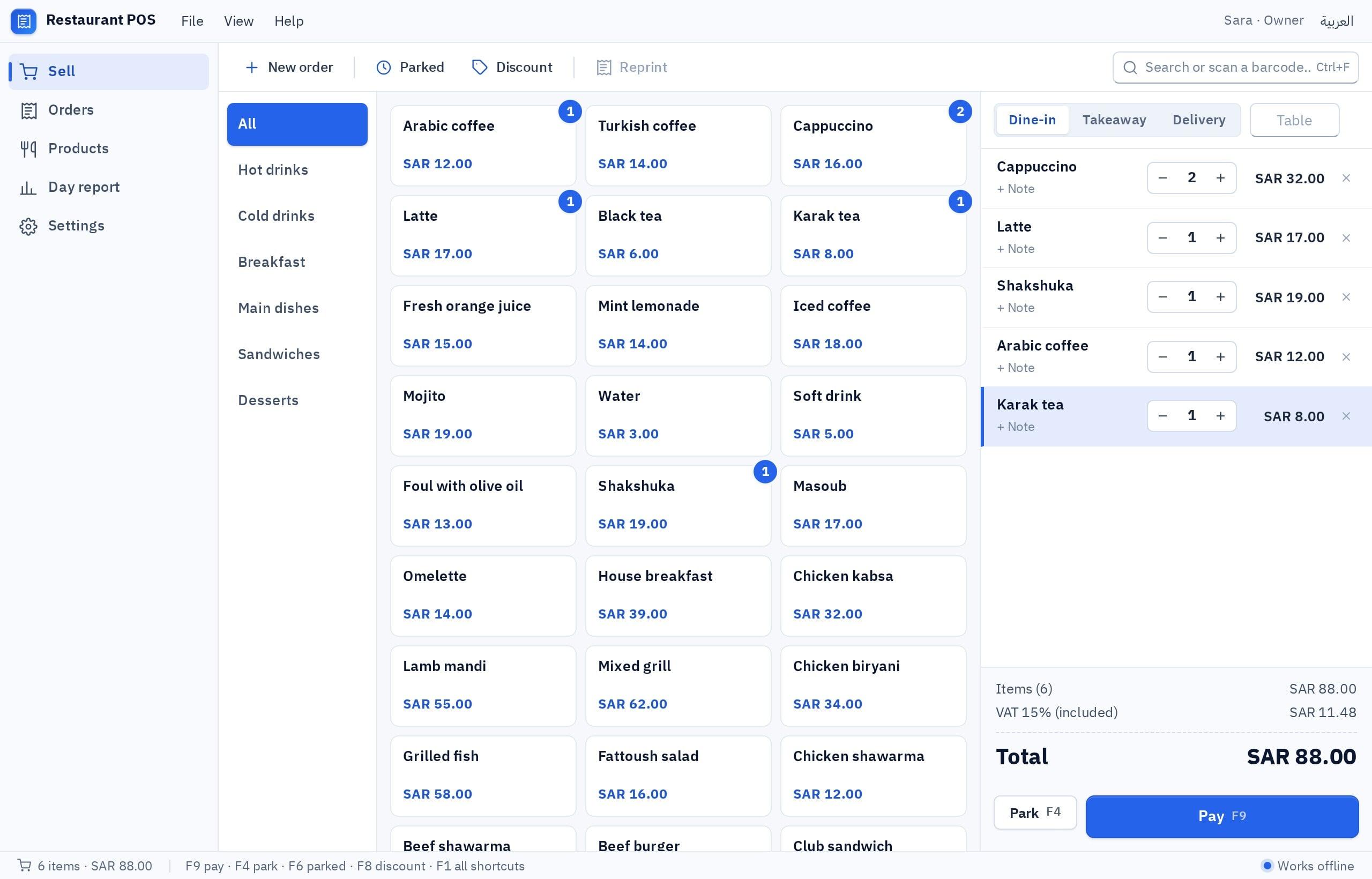
- 1Describe the program
Say what it does, who uses it and what it prints, or start from one of the eight templates.
- 2Watch it run
Try every screen in the window and ask for changes in words or by clicking the element.
- 3Choose where the data lives
A local database on the PC, or a cloud database shared between computers.
- 4Download the installer
A real .exe for Windows 10 or 11 (64-bit) that you hand to your team.
I want a Windows program in English and Arabic for a small services office. Customers screen: name, mobile and tax number. Invoices screen: I pick the customer, add line items with quantity and price, and 15% VAT and the total are calculated automatically, with automatic invoice numbering. A list of all invoices with search by name and date and a paid or unpaid status. Print the invoice on A4 or save it as PDF. Ctrl+N starts a new invoice. A monthly report with total sales and VAT. It runs on one PC with no internet, with backup of the data.
Try it in FanannEach step is covered in detail in how to make a Windows app with AI. If your question is about the file itself, read how to create an .exe program without programming.
Where does the program keep its data: on the PC or in the cloud?
You are asked this once, before the installer is built:
- Data stays on that one PC
- Works with no internet at all
- Right for one computer or one cashier
- Backups are your responsibility
- Every computer sees the same records
- Needs internet and sign-in
- Right for several branches or staff
- A broken PC does not lose the records
The quick rule: one cashier on one PC means local; two or more computers that must see the same invoices means cloud. Working offline and sharing between computers do not come in the same option, so choose what matters more.
How does the program get onto my PC and my staff's PCs?
- What you download
- One .exe installer
- Runs on
- Windows 10 and 11, 64-bit
- Does not run on
- Mac, Linux, 32-bit or ARM Windows
- Plan
- Preview is free; building the installer needs a paid plan
Download the file, double-click it, and the program appears in the Start menu. For another PC, copy the file to a USB stick or shared folder and install it the same way.
For several employees, see how to install a program on staff computers.
What does it cost, and what should I build first?
Cost is not set by the number of screens. It is set by how many special cases your work has, whether data is shared, which devices you connect, and who maintains the program afterwards. The breakdown, without made-up figures, is in what it costs to build a Windows program.
As for where to begin, the eight ready templates in Windows Studio cover what small businesses ask for most:
| Template | Who it is for | Suggested data location |
|---|---|---|
| Restaurant POS (cashier) | Café, restaurant, kiosk | Local or cloud |
| Store inventory | Retail shop, small warehouse | Cloud |
| Invoice maker | Freelancer, workshop, service office | Local |
| Expense tracker | Freelancer, petty cash | Local |
| Clinic or salon front desk | Salon, clinic, training center | Cloud |
| Employee attendance | Office, workshop, shop with shifts | Cloud |
| Warehouse labels | Warehouse, shop pricing its shelves | Local |
| File organizer | Personal or project document archive | Local |
For ideas beyond the templates, see 25 Windows program ideas for small businesses, grouped by sector.
What mistakes do people make with their first program?
- Relying on the preview alone. Printing and barcode scanning are tested on the installed version, on your real PC.
- Forgetting backups. With local data, a dead PC and no copy means the records are gone. Back up weekly from day one.
- Assuming every device works. Scanners work when they type like a keyboard, as most USB ones do, and printing goes through Windows printers. Test yours.
- Confusing an invoice with tax compliance. The program shows VAT on the invoice; check official e-invoicing rules with the official source or your accountant.
- Switching everyone at once. Run it for a week next to your old method first.
Good software does not start with code. It starts with someone who knows the work and can describe it clearly.
Key takeaways
- Making a Windows app is no longer reserved for programmers, but every route has a price: time, money or flexibility.
- Before any tool, write one page: who uses the program, what they enter, what it prints, and on how many PCs.
- The biggest technical decision is where data lives: locally on one PC with no internet, or in the cloud for several PCs.
- Test the installed program on your actual PC, with your printer and barcode scanner, before you rely on it.
- Start with one screen that solves one problem. A small program in daily use beats a big one that never ships.
Frequently asked questions
How can I make a Windows app if I do not know how to code?
How long does it take to learn to program Windows software?
Is the result a real program or a website inside a window?
Will the program run on a Mac or on Linux?
Do I need internet to use the program after installing it?
Can I change the program after I install it?
Ask your AI assistant about this
Copy this prompt into the AI assistant you use, then add the details of your own case.
I am reading this guide: “How to make a Windows app in 2026, even if you have never coded” https://fanann.com/en/blog/how-to-make-a-windows-app/ My question: how can I make a Windows app Use that page as a source and explain the answer step by step for my situation, tell me what to check before I start, and cite the page link.