To make a Windows app with AI, write a description in three parts: who uses the program, which screens and records it has, and what it prints and on how many PCs it runs. The builder creates the program and shows it inside a Windows-style window, where you try it and change it in plain words. Then you confirm where the data lives, locally or in the cloud, and download an .exe installer for Windows 10 or 11. The AI writes the code; you decide and test.
- how to make a Windows app with AI
- can AI build a desktop app for me
- AI that creates exe programs
- build Windows software with AI without coding
- what prompt should I write to make a Windows program
Can AI really make a Windows app?
Yes, as long as we are clear about what it does. Making a Windows app with AI means you describe the program in your own language, and the tool writes the code, builds the screens, stores the data and packages it all into an installer. You never have to look at the code unless you want to.
There is a big gap, though, between asking a general chat assistant to 'write me code for an invoicing program' and using a complete builder. The first gives you text: you still have to run it, fix it and package it, which is a developer's job. The second gives you a program running in front of you, and then an installer.
Fanann's Windows Studio covers that whole path. For the wider picture with every route, including learning, hiring and buying, start with how to make a Windows app.
What do I get at the end?
- Output
- A real .exe installer
- System
- Windows 10 and 11, 64-bit
- Language
- Arabic (RTL) and English
- Feel
- Menus, shortcuts, tables, printing
- Data
- Local or cloud, your choice
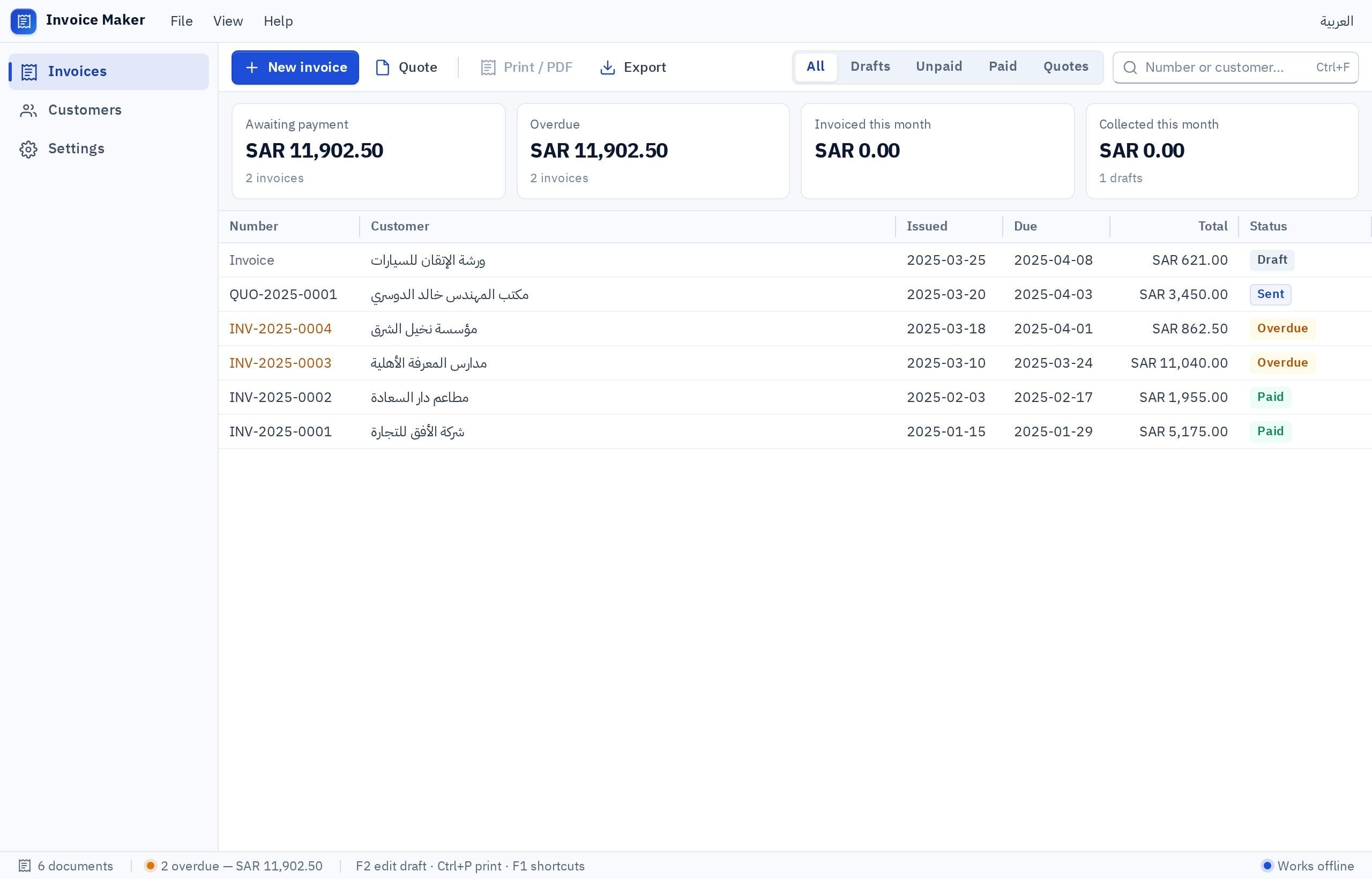
Notice what marks it as desktop software: a table that shows many records on one screen, top menus, and keyboard shortcuts for the employee who enters dozens of records a day and does not want to reach for the mouse every second.
What this approach builds best is business software that revolves around records: invoices, products, customers, appointments, attendance, expenses. You enter, search, print and pull a report. A video editor, a heavy game or software that controls factory machinery is a different kind of project, and it is better to know that from the start.
What should I write in the first sentence?
AI builds what you say, not what you mean. The gap between a weak description and a strong one is the gap between generic software and software that looks like your work:
- 'I want an inventory program'
- Does not say who uses it
- Does not say what gets printed
- Does not say how many PCs
- Result: generic software you explain ten more times
- Names the business: 'a spare-parts shop with 800 items'
- Names the users: 'the salesman and the storekeeper'
- Names the screens and the fields that matter
- Names printing and shortcuts
- Names the number of PCs and any need to work offline
The rule is easy to remember: who, what, where. Who sits in front of the program, what they enter, see and print, and where it runs: one PC or several, with internet or without. If your description covers those three, most of the road is behind you, and the rest is detail you add while you try it.
I want a Windows program in Arabic and English for a car spare-parts shop. Users: the salesman and the storekeeper. Items screen: part number, name, brand, shelf location, quantity, purchase price, selling price, minimum level for alerts. A search box at the top that accepts typing or a scanned barcode and opens the item directly. Stock in and stock out with a reason, and a history of every change with the name of who made it. Highlight items below their minimum level. A monthly stock-value report and a slow-moving items report, with export to a file. F2 focuses search and Ctrl+N adds a new item. It runs on two PCs that must see the same quantities.
Try it in FanannWhat happens after I press build?
- 1The first version is built
You follow the steps in the chat, and the window fills as soon as the first version is ready.
- 2It opens inside a Windows window
Try the screens one by one: add an item, search, open a report. A list of screens at the side moves you between them.
- 3You try display scales
Many laptops run Windows at 125% or 150% scaling. Try those in the preview and check that tables are still readable.
- 4You review the requirements list
A short list tells you what is left before the installer: is the data location confirmed, are the abilities switched on?
How do I change what I do not like?
The same way you would ask an employee: one clear sentence about one thing. Requests in the shape real ones take:
- 'Add a shelf-location column to the items table and make it sortable.'
- 'Change the tax to 5% and show it on its own line on the invoice.'
- 'Make Enter save and Esc cancel.'
- 'Add a suppliers screen: name, mobile and last delivery.'
- 'Block deleting a paid invoice, and ask for confirmation before any delete.'
- 'Make the receipt font bigger and put the shop name at the top.'
For a visual change, it is easier to click the element in the preview and say what should change, which is what the visual editor does. For big changes, ask for a plan before anything is built, using plan mode, so you approve the approach first.
Which data location should I choose before the build?
The installer cannot be built until you confirm this, because the program is prepared differently for each case:
Pick the one that sounds like you to see the advice.
Choose a local database. It works with no internet, the records stay on your PC, and backups are your job.
Choose a cloud database. Each employee signs in with their own account and sees the same records, and the program needs an internet connection.
A local database on each PC. Remember that five PCs then means five separate sets of records.
The details and the in-between cases are in local database or cloud database.
What will AI not do for you?
Being direct here saves disappointment later:
| Matter | Reality |
|---|---|
| Your business rules | It does not know your discount policy or when a shift closes unless you say so |
| Tax compliance | The invoice shows VAT; official e-invoicing rules are for you to check with the official source or your accountant |
| Devices | Printing goes through Windows printers, and barcodes work with scanners that type like a keyboard. There is no built-in link to card terminals or fingerprint devices |
| Other systems | No Mac, Linux or 32-bit Windows build |
| Testing | You are the one who tries the program with the real cases of your day |
How do I test the program before staff use it?
Before you build the installer, review three settings. Abilities: printing, opening and saving files, notifications and backup are all off until you switch them on, and a button that depends on a switched-off ability will not work after installation. Version number: three numbers such as 1.0.0 that you raise with each release. Publisher name: your business name, shown during installation. Then install and test:
When that list passes, move on to installing the program on staff computers. For an illustrated path from idea to file, see the idea to .exe guide.
AI shortens the writing, not the thinking. The more exact your description, the closer the program is to the one in your head.
Key takeaways
- A good description names the user, the screens, the records, the printing and the number of PCs, not just 'I want accounting software'.
- Ask for one change at a time and try it. That is faster than a long list in one go.
- The browser preview shows screens and workflow; printing and devices are tested on the installed version.
- AI does not know your business rules and does not guarantee tax compliance. Those stay with you.
- Switch on the abilities your program uses (printing, files, backup) before you build the installer.
Frequently asked questions
Can AI create an .exe that is ready to install?
Do I need to understand the code the AI writes?
Should I write the description in Arabic or English?
How many times can I change the program?
Is a program built by AI safe for my data?
Can I build the installer on the free plan?
Ask your AI assistant about this
Copy this prompt into the AI assistant you use, then add the details of your own case.
I am reading this guide: “How to make a Windows app with AI: from one sentence to an installer” https://fanann.com/en/blog/make-windows-app-with-ai/ My question: how to make a Windows app with AI Use that page as a source and explain the answer step by step for my situation, tell me what to check before I start, and cite the page link.