Start from a template if your business resembles a known type, such as a restaurant cashier, shop inventory or clinic booking, and the template covers more than half of what you need; editing something that works is faster than describing everything. Start from scratch if your way of working is different, or you already have data or a design to build around. Fanann has templates for web business apps, 8 templates for Windows programs, 8 for 2D games and 7 for 3D worlds, and every template is edited by chat once created.
- template or from scratch
- should I use an app template
- ready made app templates to customize
- POS software template
- game templates to edit without coding
- how to choose a template for my app
Template or from scratch: what is the short answer?
The answer to this old question has changed. A template once meant accepting what was in it, and 'from scratch' meant months and a budget. Today a first version is built from a description quickly, and a template is edited by chat. The gap has narrowed, and the right question is: which gets me faster to something that looks like my business?
Pick the one that sounds like you to see the advice.
Restaurant, shop, clinic, salon, warehouse. Start from a template: it carries the screens, data and order of steps others already worked out.
Start from your description. If you would change most of a template, you are building from scratch with the extra burden of removing things first.
Neither: start from what you have. It is your own template, more accurate than a general one.
Open a close template and try it for ten minutes. Seeing something work teaches you what you want faster than thinking on paper.
What do you actually get when you choose a template?
A template is not 'a ready design'. In business apps the look is its least valuable part. The value is in three things a picture does not show:
- The data structure: what the system stores and how it connects. In a cashier template: products, categories, orders, lines and invoices.
- The workflow: the order of steps as they really happen: new order, add items, change a quantity, pay, receipt.
- The details you would forget: removing a line from an open order, today's sales report, what shows when there are no products.
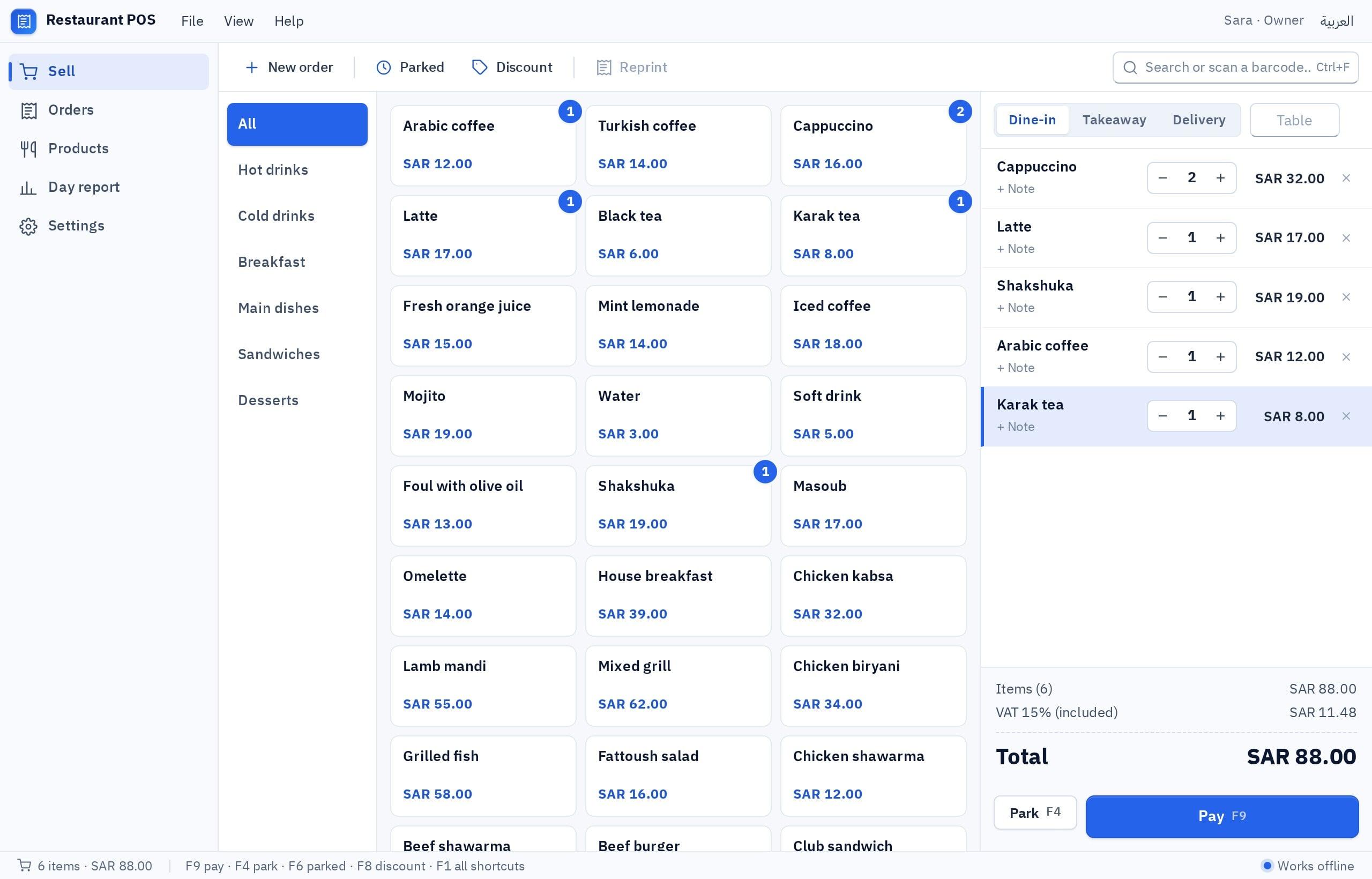
In Fanann, a template's details show its screens, the data it manages, example requests and ideas for later features, with a demo to open before deciding.
- In a template
- Screens, data structure, workflow, sample content
- Not in it
- Your data, your brand, your own business rules
- After creating
- You edit everything by chat
When does a template win, and when does starting from scratch win?
- Your business resembles what it was designed for
- You want something working today to try with staff
- You do not yet know everything you need, and it reminds you
- This is the first program you have ever built
- Your differences are additions, not fundamental changes
- Your workflow differs from the norm in your field
- You have a requirements document, a design or a data file
- You would delete more of the template than you keep
- The product is a new idea, not a known type
- You want control of every decision from the first screen
The half rule
Write the ten most important things your system must do, then count how many the template does as it stands. Six or more: start from it. Three or fewer: start from your description. In between, look at the data: if its structure matches your business, stay, because changing screens is far easier than changing data.
How do you judge a template in five minutes?
Open the demo and run one real transaction from your business end to end. Do not just browse. Then answer:
Which templates exist for each kind of project?
The kind of project changes the answer. If it is not settled yet, first read website, mobile app, Windows program or game.
| Kind | What Fanann offers | When to start from scratch instead |
|---|---|---|
| Web app or website | Templates for ready business apps you fit to your business | A product with a new idea, or an internal system with its own rules |
| Windows program | 8 templates: restaurant POS, store inventory, invoice maker, expense tracker, clinic or salon front desk, employee attendance, warehouse labels, file organizer | A specialized desktop tool unlike any of them |
| 2D game | 8 templates: platformer, endless runner, space shooter, maze, match-3, kids quiz, top-down racing, tower defense | A game mechanic of your own invention |
| 3D world | 7 templates: obstacle course, kart racer, exploration island, puzzle adventure, product showroom, room design, warehouse tour | A scene specific to your place or product |
| Mobile app | Built from your description, from an identity extracted from your design, or from a requirements document | This is the usual route here |
 Illustration
For a first game a template is almost always the best choice: you begin with something playable, then change the character, levels and speed until it is yours. Each Windows template comes with a suggested data location: local for one PC that works offline, or cloud for more than one.
Does 'from scratch' mean a blank page?
No. Most people who start 'from scratch' already have something to start from. Five starting points, each more accurate than a general template:
| What you have | Start from | What you get |
|---|---|---|
| An idea in your head | A typed or spoken description | A first version you edit by chat |
| An Excel file you run the business on | Excel to App | A system with screens, forms, reports and roles, your rows imported |
| A logo and screenshots or a design | Design to App | An identity board you adjust, then an app that follows it |
| Many unordered ideas | Product Owner Noura | A requirements document and task list handed to the builder |
| A clear description, and you want a review before building | Plan mode | Quick questions, then a plan you edit and approve |
Each start has its guide: how to turn an Excel sheet into a real system and how to make a system from a screenshot.
How do you start in Fanann, either way?
Route one: from a template
- 1Browse the templates
Search or filter by category, and open a template's details.
- 2Try the demo
Run the five-minute test on a real transaction from your business.
- 3Use the template
Name your app and choose its address; the app is created and the builder opens.
- 4Fit it to your business
Write the customization request: what to add, what to remove, what to rename.
Fit this template-based app to our perfume and incense shop in Sharjah. Rename 'products' to 'items', and add to each item its size in ml and a perfume type: oud oil, incense, oil perfume, spray. Add an alert when any item's quantity falls below five pieces. Remove the delivery section because we sell in the shop only. Prices include 5% VAT. Add two roles: a salesperson who sells but cannot change prices, and a manager who sees the daily and monthly sales report. Replace the sample data with ten of my own items, which I will send after this request. Arabic right-to-left interface.
Try it in FanannRoute two: from your description
Write four things: who uses the system, what each one does, what data there is, and which rules apply. Choose plan mode to be asked first and see the plan before any building. For wording help, how to write prompts that build better apps has many examples.
What are the common mistakes, and what should you do in the first week?
- Trying five templates without testing any. Pick the closest and run a full transaction.
- Keeping everything 'just in case'. Unused screens distract staff. Remove them.
- Leaving the sample data. Enter your own data on day one; a template's problems only show with it.
- Starting from scratch out of pride. If yours is an ordinary restaurant, the cashier template saves you a lot.
- Clinging to a template that does not fit. If you fight it in every request, start from your description.
- Day 1Choose and try
The five-minute test, then create the app.
- Day 2Fit it to you
Names, fields, rules and roles. One request per change.
- Day 3Enter your data
Real data from your business in place of the samples.
- Days 4 and 5Try it with its real user
One employee for a full day. Note every stumble.
- Days 6 and 7Fix and publish
Handle the notes, then publish the app or download the installer.
The decision is not final: once created, a template is an app like any other, edited by chat. For a wider view, read what you can build with AI.
Key takeaways
- A template is a data structure, screens and a ready workflow, not just a look.
- The rule: if a template covers more than half your needs, start from it; otherwise start from your description.
- Judge a template by its data and workflow, not its colors; colors are the easiest thing to change.
- 'From scratch' is not a blank page: you start from a description, an Excel file, a design or a requirements document.
- Either way the result is an app you edit by chat, so the decision is not final.
Frequently asked questions
Will a template limit me later?
Is starting from scratch harder for a beginner?
Can I change a template's look completely?
How many templates does Fanann offer?
Can I import my data into an app started from a template?
What if there is no template for my field?
Ask your AI assistant about this
Copy this prompt into the AI assistant you use, then add the details of your own case.
I am reading this guide: “Start from a template or from scratch? How to choose” https://fanann.com/en/blog/start-from-a-template-or-from-scratch/ My question: template or from scratch Use that page as a source and explain the answer step by step for my situation, tell me what to check before I start, and cite the page link.