There are six ways to make a Windows program: learn to program with professional tools, hire a freelancer, hire a software company, buy ready-made software, use a low-code tool, or describe it to an AI builder. Ready-made is fastest when it matches how you work. A company suits large, sensitive systems. Learning is an investment for people who want the skill. An AI builder is the shortest road to a small or mid-sized custom program, provided you accept its limits, such as running on 64-bit Windows 10 and 11 only.
- ways to make a windows program
- how to make a program for pc
- should i learn to code or hire a developer
- custom software vs off the shelf software for small business
- best way to make a desktop app for my business
- how long does it take to make a windows program
What are the real ways to get a Windows program made?
A shop owner wants an invoicing program on the shop PC. There are six ways to get one, and none is best for everyone, because each is paid for in a different currency: your time, your money, your control over the result, or your patience with maintenance. This comparison sets them side by side without prices, since prices change by country and by project. What drives the cost does not.
 Illustration
- Learn to program and build it with the usual professional tools.
- Hire a freelancer to build it.
- Hire a software company.
- Buy ready-made software and adapt to it.
- Use a low-code tool and assemble it yourself.
- Describe it to an AI builder and receive the installer.
Two of these are often forgotten. Buying ready-made is a way of getting a program, and usually the right first check. And the paths are not exclusive: a company can start from a version you built yourself, and a freelancer can deliver with a builder. Read what follows as a map, not a race with one winner.
Should you learn to program and build it yourself?
The classic route to Windows software is learning a language such as C# and working in a development environment such as Visual Studio. Others use C++, Python or Java. The basic tools are free and tutorials are everywhere. The obstacle is time. Between the first lesson and the first program a real shop can depend on lie months, because a program is more than screens: a database, printing, backups, an installer, and then updates.
- You want programming as a career or a long-term skill
- You have steady hours every week for months
- You enjoy solving technical problems
- The project is not urgent
- You need the program working this month
- All your time goes into running the business
- You want the result, not the road
- Nobody can review your work
Should you hire a freelancer or a software company?
Both mean someone else builds while you explain and review. They differ in scale and in guarantees:
- Quicker to start and usually cheaper
- You talk to the person writing the code
- Fits a program with a limited set of screens
- The risk: they get busy or vanish, and maintenance stalls
- A team: analyst, designer, developers, tester
- A contract, a warranty and ongoing support
- Fits large and sensitive systems
- The price: higher cost, a longer cycle, more meetings
Two detailed comparisons: AI builder or freelancer and the software companies comparison page.
Is ready-made software or a low-code tool enough?
Ready-made software is the first thing to check. Accounting, cashier and inventory packages are plentiful and mature, with support and updates. If one matches most of how you work, buy it and do not build. Trouble starts when your work differs from the template: a field that does not exist, a report you cannot change, or a subscription that grows with every user while you pay for features you never open.
Low-code tools such as Microsoft Access or Power Apps sit in the middle: you assemble tables and forms yourself with configuration and some formulas. They suit people who are comfortable with spreadsheets and patient. Their limits: a real learning curve, dependence on the tool's platform and licenses, and friction once the program grows or needs its own look.
Pick the one that sounds like you to see the advice.
Buy it. Run the trial for a week on real data, and confirm you can export your data if you leave.
Write down what is missing. If it is one item, ask the vendor. If the list is long, you need a custom program.
A custom program: a freelancer, a company or an AI builder, depending on size and urgency.
How does an AI builder make a Windows program?
This is the newest of the six: you describe the program in Arabic or English the way you would explain it to a new employee, and it is built and runs in front of you. In Fanann that takes four steps: describe it, see it running inside a Windows-style window in the browser, choose where the data lives (local on the PC, or shared in the cloud), then download the installer.
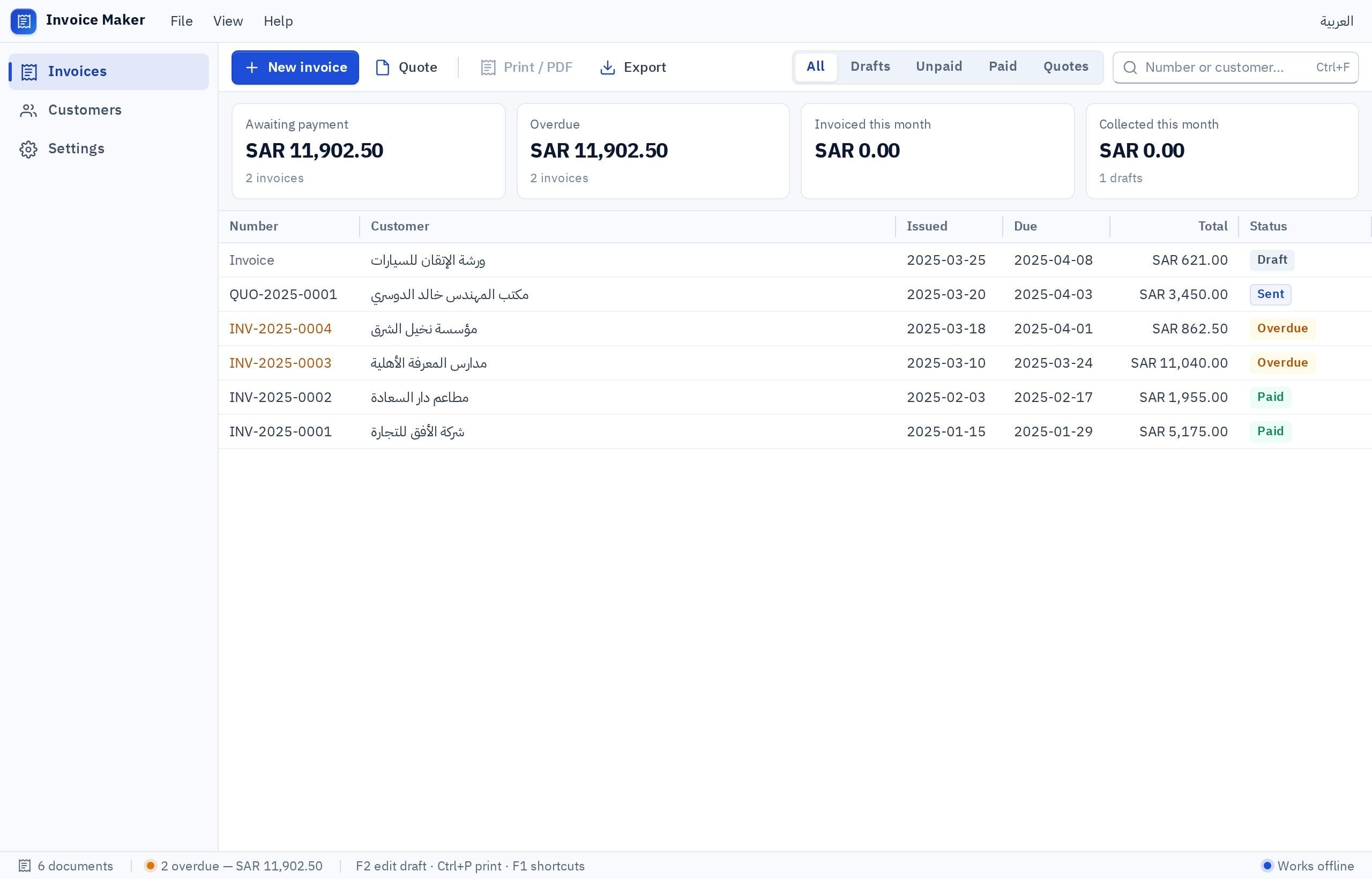
Build a Windows invoicing program for a small services office, in Arabic, with a local database. A customers screen; an invoice screen with line items, quantities and prices plus VAT; automatic numbering; an invoice list with search and a status filter (paid, unpaid); invoice printing; and a monthly totals report. A keyboard shortcut for a new invoice.
Try it in Fanann- Runs on
- Windows 10 and 11, 64-bit only
- Devices
- Windows printers; barcode scanners that type like a keyboard
- Plans
- Design and preview free; the installer needs a paid plan
How do the six compare on time, cost, control and maintenance?
| Way | Time to a first version | What drives the cost | Your control | Maintenance |
|---|---|---|---|---|
| Learn to program | Months | Your own time | Full | Yours |
| Freelancer | Weeks | Number of screens, hours, change requests | High if you get the code | Depends on their availability |
| Software company | Usually months | Team size, project length, support contract | High, through process | By contract |
| Ready-made software | Days | Subscription or license, number of users | Low | The vendor's |
| Low-code tool | Days to weeks | Platform licenses and your time | Medium | Yours, within the platform |
| AI builder | Hours to days | The plan, and your time describing and testing | High over behavior, bounded by what the builder supports | You change it by describing |
The most important column is the last one. Most people compare the cost of the first build and forget that a program lives for years while the business changes around it: a new price, a tax adjustment, a branch opening. The way that keeps small changes easy wins over time.
Which way fits your situation?
Pick the one that sounds like you to see the advice.
Check ready-made first. If it does not fit, an AI builder: you see the program running today and change it yourself when your work changes.
A software company with a support contract: payroll, integration with other systems, audits, or regulatory requirements that need one accountable party.
Learn to program. Start with a small project of your own, and do not tie your income to it before it works.
A freelancer or small agency: use a builder to deliver sooner, and keep your hours for understanding, testing and training.
The ways combine. Many people build a first version with a builder to confirm the idea is right, then decide whether to keep going there or take what they learned to a company. The practical guide is how to make a Windows app.
What should you ask whichever way you choose?
- Who makes changes when my work changes? And how long does a small change wait: minutes or weeks?
- Where is my data? On my PC or with someone else, and can I export it?
- What if the builder disappears? A freelancer gets busy, a company closes, a platform changes its terms.
- Have I tried it on my own machine? With my printer, my barcode scanner and my version of Windows.
- Who trains the staff? A program nobody was shown how to use sends people back to the notebook within a week, so agree who explains it and when.
The cheap program is the one you can change the day your work changes, not the one you paid least for the day it was built.
Key takeaways
- If a ready-made program matches most of your work, buy it. Nothing is faster than ready-made that fits.
- Learning to program is a road to a career, not a fix for this month's problem.
- With a freelancer or a company, the written agreement protects you: source code, installer, maintenance.
- The real cost is not the first build but the changes after it, so always ask who makes them and how long they wait.
- An AI builder suits small and mid-sized custom programs, and has stated limits you should know before you start.
Frequently asked questions
What is the fastest way to make a Windows program?
Should I learn to code to make a program for my shop?
Does a program built with AI work without internet?
What is the difference between low-code and an AI builder?
Can I move from one way to another later?
When do I really need a software company?
Ask your AI assistant about this
Copy this prompt into the AI assistant you use, then add the details of your own case.
I am reading this guide: “6 ways to make a Windows program, compared honestly” https://fanann.com/en/blog/ways-to-make-a-windows-program-compared/ My question: ways to make a windows program Use that page as a source and explain the answer step by step for my situation, tell me what to check before I start, and cite the page link.