A cashier program for a shop in Saudi Arabia must sell at prices that include 15% VAT and show the VAT amount and VAT number on the invoice, put Arabic first on screen and receipt, record the payment method (mada, card, Apple Pay, cash), and close the drawer daily. You can subscribe to a ready system or build your own: in Fanann you describe the cashier and download it as a Windows program. A built program shows VAT on the invoice, but it is not a certified e-invoicing solution, so ZATCA's requirements are yours to verify on its official site or with your accountant.
- cashier program in saudi arabia
- pos software for a shop in riyadh
- arabic cashier software with 15 vat
- baqala pos program without monthly subscription
- is my own pos program zatca compliant
- pos for abaya or perfume shop in saudi
What makes a cashier program for a Saudi shop different?
 Illustration
Cashier programs everywhere share a core: items, total, receipt. A shop owner in Riyadh, Jeddah, Dammam or Abha needs a few specific things on top.
- Tax
- 15% VAT shown on the invoice
- Language
- Arabic first, right to left
- Payment
- mada, cards, Apple Pay and cash
- Currency
- Riyals and halalas in clear digits
- Invoice
- Requirements set by ZATCA
- Seasons
- Ramadan, Eid, National Day, back to school
Screens and hardware are covered in the general guide, a cashier program for a PC.
What must appear on a cashier invoice in Saudi Arabia?
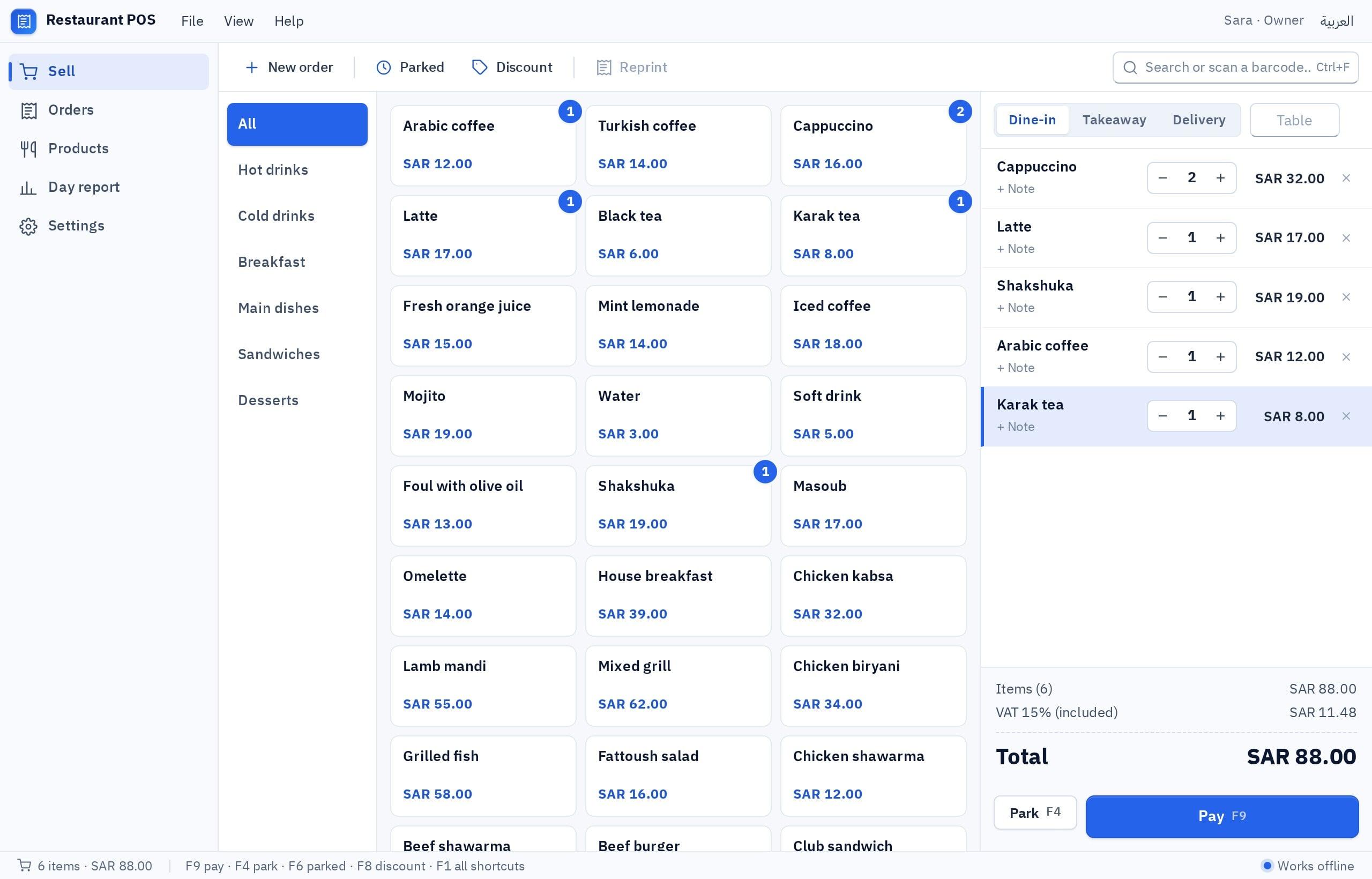
Retail sales to individuals usually produce a simplified tax invoice. Its customary content:
| Detail | Example | Note |
|---|---|---|
| Business name and address | Al Waha Sweets, Al Nuzha, Riyadh | As on the commercial registration |
| VAT number | The VAT registration number | For VAT-registered businesses |
| Invoice number, date and time | A sequence that never repeats | Time matters on a simplified invoice |
| Items | Name, quantity, price | Clear Arabic names |
| Total before VAT | 100.00 | Derived from the inclusive price |
| VAT at 15% | 15.00 | On its own line |
| Total including VAT | 115.00 | The most prominent number |
| Payment method | mada, cash, mixed | Helps you reconcile the drawer |
What does each kind of shop need?
There is no single Saudi cashier. Shops differ in how they sell, not in the tax:
| Shop | How it sells | What the cashier must do well |
|---|---|---|
| Baqala or grocery | Many items, fast scanning, small baskets | Barcode scanner, name search, selling by piece and carton, a credit ledger for neighbors |
| Specialty café | Few items, many modifiers | Large buttons, modifiers (milk, size, sugar), customer name on the order, evening rush |
| Restaurant or buffet | Dine-in, takeaway and delivery | Order type, item notes, delivery-app orders separated in reports |
| Abayas or fabrics | Sizes, colors and tailoring | Items with variants, deposit and balance, pickup date, alterations |
| Perfume, incense and oud | Sold by tola, gram and bottle | Several units per item, filling to order, gifts and wrapping |
| Workshop or car wash | Service plus parts | Labor and parts on one invoice, plate number, job status |
| Barbershop or salon | Services by a named staff member | The provider's name on each line, to work out commission |
Deeper examples: a perfume and oud store and a restaurant POS system.
How do customers pay, and how does the program record it?
Card and phone payments are familiar in Saudi shops even for small amounts, and cash remains:
- mada, credit cards and Apple Pay: all go through the bank's card terminal on the counter. Staff key the amount into the terminal, then choose Card in the program.
- Cash: they type the amount received and the program works out the change.
- Mixed: part cash, part card, each recorded by its method.
- Bank transfer: common for larger amounts, tailoring and workshops. It needs a field for the reference number.
- Credit: the neighborhood ledger in baqalas, or companies with an account. It needs a balance per customer and a statement.
More on Gulf payment methods: the local payments guide.
Must the program be in Arabic, and what about non-Arabic-speaking staff?
Customers are mostly Arabic speakers, and the receipt is read by customer, accountant and auditor, so Arabic leads there. The salesperson's screen should follow whoever stands at it:
- The printed receipt and invoice
- Item names as customers ask for them
- Reports read by the owner and accountant
- A right-to-left screen direction
- The salesperson's interface, with an English toggle
- An English item name as a second line for search
- Search in Arabic or Latin letters
- Digits as 0-9, clear to everyone
Many foreign systems add Arabic over an English design, and long names break on the receipt. Test with your longest item name. Common mistakes: Arabic-first UX.
Is a program I build enough for e-invoicing requirements?
The honest answer: it depends on your business's status with ZATCA. E-invoicing (Fatoora) came in phases, and the integration phase covers businesses in successive waves, each notified in advance.
Pick the one that sounds like you to see the advice.
You need a solution that meets ZATCA's technical requirements and connects to its platform. A program built with Fanann is not that. Use a compliant solution for invoices, and build your other tools (stock, attendance, labels) yourself.
Review the generation-phase requirements on ZATCA's site, ask your accountant what applies today, and watch for wave notices.
Confirm with your accountant that you are below the mandatory registration threshold. If so, the program should not show a tax you do not collect.
Ask your accountant or ZATCA first. The software decision comes after you know your status.
The phases and waves are explained in ZATCA e-invoicing phases, with a practical list in the wave 25 checklist.
Subscribe to a ready Saudi POS system, or run my own program?
The Saudi market has well-known cloud POS systems with hardware and Arabic support, many stating compliance with ZATCA's requirements. Real advantages, at a price:
- Ready today, with hardware and setup
- Vendor support and updates
- Stated e-invoicing solutions
- A recurring fee that usually grows with branches and tills
- The workflow as the vendor designed it
- Screen, receipt and reports cut to your shop
- Works offline if you choose local data
- Your data on your PC, with your backup
- You test the printer and scanner and keep the backups
- Not a certified e-invoicing solution
A middle path: a compliant system for invoices, and small built programs for what it does not cover. Ideas: programs for small Saudi shops.
How do I build a cashier program for my shop with Fanann?
In Fanann's POS software builder, start from the POS template or a description and watch the cashier run inside a Windows-style window. Then choose where data lives and download an installer for 64-bit Windows 10 or 11.
I want a cashier program for an abaya shop in Riyadh, in Arabic (right to left) with an English toggle for the salesperson's interface. Items have a model, size and color, with a quantity and barcode per combination. Prices are entered including 15% VAT, and the invoice shows the total before VAT, the VAT amount on its own line, and the inclusive total. Receipt header: shop name, address, VAT number, invoice number, date and time. Tailoring order: customer name and mobile, measurements, notes, deposit paid and balance, and pickup date, with a screen of tailoring orders by status (new, at the tailor, ready, delivered). Payment: cash with change, card (recorded by hand), transfer with a reference number, or mixed. Returns and exchanges linked to the original invoice within a period I set. Discounts for the supervisor only, with a reason. Open and close a shift with a cash count, and a daily report separating cash, card and transfer. Printing on an 80 mm thermal printer. Backup to a file.
Try it in FanannWhen should I go live so a season does not catch me out?
The worst time to change a cashier is a Ramadan night or Eid week. Plan four calm weeks ahead:
- Week 1Status and items
Confirm your tax status and invoice requirements with your accountant. Clean the item list and inclusive prices.
- Week 2Build and desk test
Describe the program, preview it, enter your items, and review test receipts with the accountant.
- Week 3Run both
Use it in quiet hours next to your current method. Train everyone on a sale, a return and a close.
- Week 4Go live
A full week on the program alone, with a daily match of cash and of the mada terminal slip.
- Pre-seasonFreeze, do not change
Stop all changes two weeks before the season. Update prices and offers only, and back up every night.
More guides written for the Saudi market are on the Saudi Arabia page.
Key takeaways
- Customers in Saudi Arabia expect the displayed price to be final, so run the program on VAT-inclusive prices and break the tax out on the receipt.
- Arabic first on screen and receipt, with an English option for staff who prefer it.
- The mada terminal is separate from the program: the amount is keyed into it and the payment method recorded in the cashier.
- Showing VAT on an invoice is not e-invoicing compliance. Check your business's status with ZATCA before choosing any solution.
- Get the program ready before the seasons, not during them: Ramadan, Eid and National Day are no time to experiment.
Frequently asked questions
What is the best cashier program for a shop in Saudi Arabia?
Is a program built with Fanann ZATCA compliant?
How do I make an Arabic cashier program for my shop?
Does the program connect to the mada terminal?
Should I enter prices with or without VAT?
Does the cashier work if the shop's internet goes down?
Ask your AI assistant about this
Copy this prompt into the AI assistant you use, then add the details of your own case.
I am reading this guide: “Cashier program for a shop in Saudi Arabia: what it must do” https://fanann.com/en/blog/cashier-program-saudi-arabia/ My question: cashier program in saudi arabia Use that page as a source and explain the answer step by step for my situation, tell me what to check before I start, and cite the page link.