Choose a desktop app if the work happens on a fixed PC, must continue when the internet drops, and depends on fast printing, a barcode scanner and keyboard entry. Choose a web app if users are on different devices and in different places, on phones, or if your customers themselves will use it. There is a middle path: a desktop app with cloud data, which shares records between several PCs but needs internet.
- desktop app vs web app for small business
- should I build a desktop app or a web app
- is a desktop program better than a cloud system
- do I need Windows software or a website for my shop
- when to choose a desktop application
- installed software vs cloud software
What is the real difference between a desktop app and a web app?
A desktop app is installed on a computer and runs from it: it has an icon, a window and menus, and its data can stay on that same PC. A web app lives on a server and you open it in a browser from any device, with an address and a sign-in. From the outside they can look alike, but they differ in three things that touch your day: internet, connected devices, and who reaches what from where.
One common impression is worth correcting at the start: that web is modern and desktop is old. In reality each is a tool for a job. Nobody calls a hammer outdated because screwdrivers exist. The right question is not which is newer but which fits the place where the work gets done.
 Illustration
| Criterion | Desktop app | Web app |
|---|---|---|
| Where it runs | On the PC it is installed on | In a browser on any device |
| Internet | Not needed with local data | Always needed |
| Printing | Straight to Windows printers | Through the browser's print dialog |
| Fast entry | Shortcuts, menus, dense tables | Good, but bounded by the browser |
| Phones | No | Yes |
| Updates | Install a newer version on each PC | Once, for everyone |
| Customer access | No | Yes, by link |
When is a desktop app the better choice?
When the work is tied to a specific place and PC, and cannot afford to stop:
- A cashier in a shop or café: the queue does not wait for the internet to come back.
- Heavy data entry: an accountant entering hundreds of lines, or a storekeeper scanning item after item. Shortcuts save hours.
- Frequent printing: receipts, labels and invoices that come out with one key press and few dialogs.
- Weak or patchy internet: a warehouse in an industrial area, a farm, a kiosk in a market.
- Data you prefer to keep in the office: records you want on your own PC, under your hand.
- A single user: a freelancer issuing invoices or tracking expenses, with no need for a server or accounts.
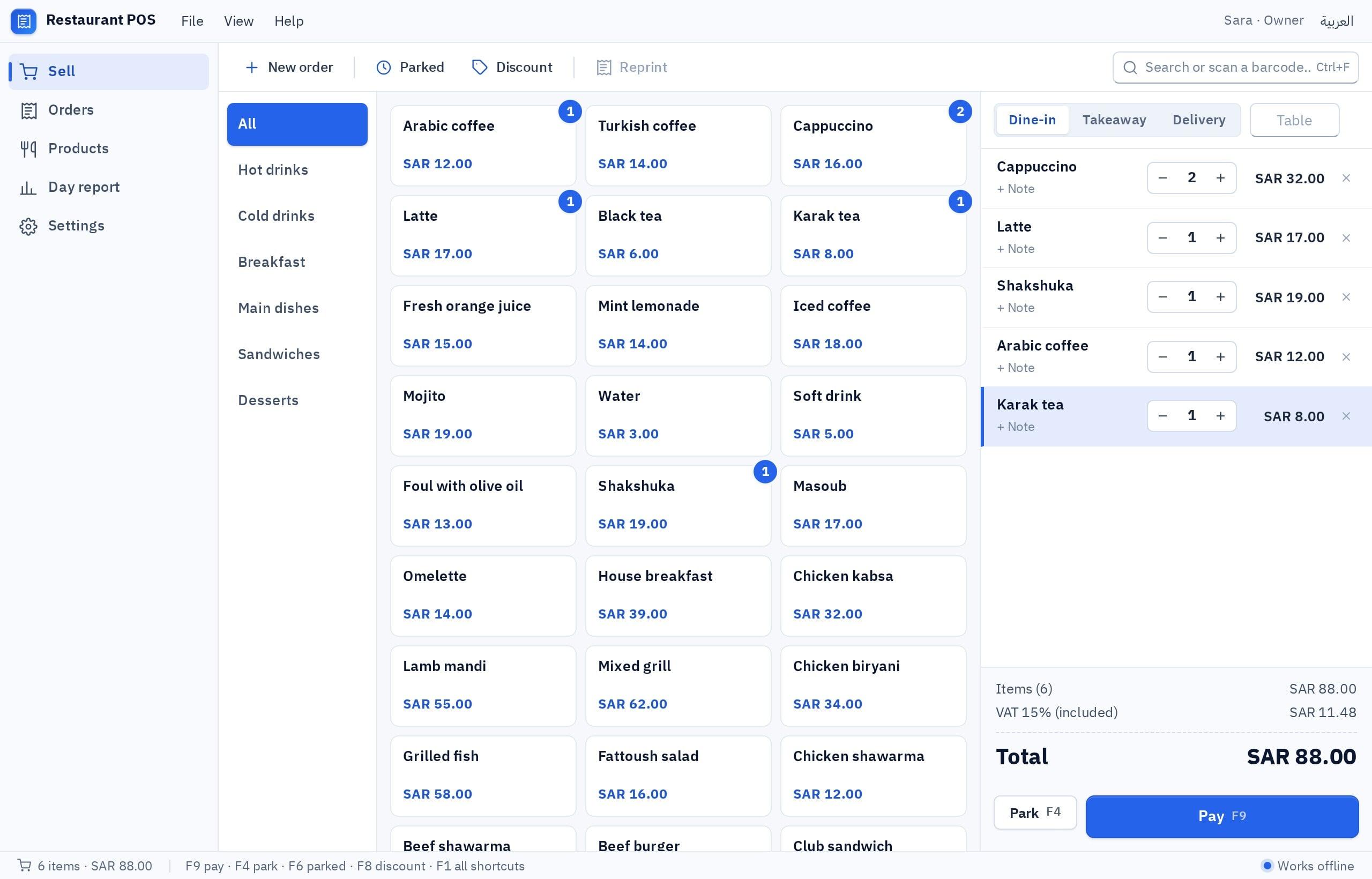
If working offline is your main motive, when it is required and what it costs you is covered in software that works without internet.
When is a web app the better choice?
When the people, not the PC, are the ones moving:
- Customers will use it: booking, ordering, tracking a shipment. No customer installs software to book with you.
- Staff in the field: a sales rep or a technician working from a phone.
- A team on mixed systems: some on Mac, some on Windows, some on tablets.
- Many branches, central management: a manager who wants to see every branch from home.
- Online payment: a store or booking flow with local payment methods needs a website anyway.
- Frequent changes: you want every change to reach everyone at once, without touring the PCs.
Which one fits my case exactly?
Pick the one that sounds like you to see the advice.
A desktop app with a local database. It works whatever happens to the internet. The price: the records are on that one PC, and backing them up is on you.
A web app, or a desktop app with a cloud database if everyone is on Windows PCs in the office. Both need internet.
A web app, without hesitation. The customer opens a link on a phone and installs nothing.
Start with the screen that hurts most. If it sits on the counter PC, go desktop; if it sits in the rep's phone, go web. The rest comes later.
| Business | Usually best | Why |
|---|---|---|
| Coffee kiosk with one till | Desktop, local data | Selling never stops, quick receipts |
| Salon with three stylists and a front desk | Desktop with cloud data, or web | Everyone sees the same schedule |
| Clinic offering patient booking | Web for booking | Patients book from their phones |
| Small accounting office | Desktop | Heavy entry and shortcuts |
| Distribution company with reps | Web or mobile | The work is in the field |
| Online store | Web | Customers and payment are online |
If your doubt is wider, between a website, a mobile app and a program, see website, mobile app, Windows program or game.
What about printers, barcode scanners and other devices?
Most comparisons skip this, and in shops it is what settles the matter:
| Device | In a desktop app | In a web app |
|---|---|---|
| Receipt or A4 printer | Prints through printers installed in Windows | Goes through the browser's print dialog and settings |
| Label printer | A print job at the size you set in Windows | Possible, but sizing is fiddlier |
| USB barcode scanner | Works if it types like a keyboard | Works the same way inside an input field |
| Card terminal | No built-in link; the payment method is recorded by hand | Depends on what the terminal provider offers |
| Fingerprint device | Not supported; check-in happens on the PC | Depends on the device and its vendor |
Is there a middle path between the two?
Yes: a desktop app with a cloud database. The employee keeps the feel of installed software, with its shortcuts and printing, while the records are shared between every PC that signs in.
Let us be clear about what this gives and what it does not: sharing needs internet. If the connection drops, a program with cloud data stops until it returns, just like a web app. Working offline and sharing records are not available together in one option, so decide which matters more. The full comparison is in local database or cloud database.
How do running and upkeep differ over time?
- No hosting fees for local data
- Backups are yours: a file you keep off the PC
- Updates by installing a newer version on each PC
- A dead PC with no backup means the local records are lost
- 64-bit Windows 10 and 11 only
- Hosting and a database that run continuously
- Records are kept on the server, not on one device
- Updates reach everyone at once
- An internet outage stops the work
- Runs on any device with a browser
Neither side is always cheaper. A program on one PC with local data is the simplest thing you can run. As PCs and branches multiply, the balance tips toward web or cloud data, because touring twenty PCs to install each new version becomes a job in itself.
One piece of advice applies to both: ask from the start how you get your data out. Software that cannot export its records to a file locks you in, whatever its type. Ask in your description for invoices, products and customers to be exportable to a file, and try it once before the records pile up.
How do I try both before deciding?
The advantage of building from a description is that you do not have to settle this in theory. Write one description and see it in both forms. This one works well as a test:
I want a front-desk program for a salon, in Arabic and English. A day board of appointments with a column per stylist (three stylists); book an appointment by choosing the customer, the service and the duration; move or cancel it from the same screen; and prevent double booking for the same stylist. A customer list: name, mobile, notes and last visit. A list of services with prices and durations. A daily report with the number of appointments and expected revenue. Ctrl+N starts a new appointment. It runs on the front-desk PC and the manager's PC, and both must see the same schedule.
Try it in Fanann- 1Build it as a Windows program
In Windows Studio, and try how fast booking is from the keyboard inside the window.
- 2Ask who else will open it
If customers will book for themselves, build a web booking page next to it.
- 3Decide from use, not opinion
Let the receptionist try it for fifteen minutes. What she says is more reliable than any comparison.
Do not pick a technology and then look for a use. Look at where the employee sits and what is in their hands, and the answer arrives by itself.
Key takeaways
- The deciding question: must work continue when the internet drops? If yes, a desktop app with local data.
- If customers or staff outside the office will use it, a web app is the answer.
- Cashier work, stocktaking and heavy data entry benefit from the shortcuts and direct printing of a desktop app.
- A web app updates for everyone at once; a desktop app updates by installing a newer version on each PC.
- You do not have to choose forever. Many businesses need both, each for its own job.
Frequently asked questions
Should I use a desktop program or a website to manage my shop?
Does a web app work without internet?
Are desktop apps outdated?
Can I use both together?
Which is easier to update?
Does a desktop app work on a Mac?
Ask your AI assistant about this
Copy this prompt into the AI assistant you use, then add the details of your own case.
I am reading this guide: “Desktop app or web app: which does your business actually need?” https://fanann.com/en/blog/desktop-app-vs-web-app/ My question: desktop app vs web app for small business Use that page as a source and explain the answer step by step for my situation, tell me what to check before I start, and cite the page link.